First of all, it is possible that your very first Flutter project seems to be somewhat intimidating.
Yes, you definitely know that you want to create your application. Suddenly you see dart files, widgets, folders, properties, and some errors that you do not get. Even creating a button may become a search in documentation for you.
Do not be scared. There is much to learn, but there is no need to know everything before you create your first application.
If you have never worked with Flutter, then you definitely need to begin with Dart programming language. Of course, you do not need to become an expert in it. Just learn enough to understand what is going to be written. You definitely need to learn variables, functions, conditions, loops, lists, maps, classes, and null safety.
At first, a few Dart concepts might take some time to understand. For instance, like Future, async, and await. Do not try to remember everything about it for several days. It will become more understandable when you need to get data from API.
Then, just open Flutter and create a very simple screen.
Place a header. Place some text. Place a button. Adjust spacing. Reorder elements.
It does not seem like much but now you will start noticing something very crucial: everything in Flutter is based on widgets. Text is a widget. Images are widgets. Buttons are widgets. Even layouts are created out of widgets.
Initially, you may find yourself constantly checking widget names for the next few minutes. It is okay. There is no need to remember all the widgets in Flutter. You will automatically learn the ones you constantly use.
This is also the time to stop creating practice screens.
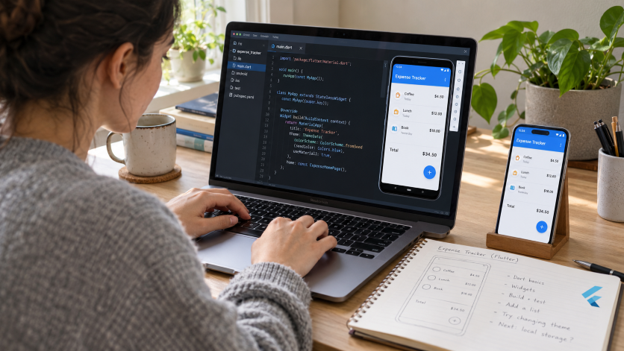
Choose something that you know and try to create it. For example, an expense tracker can be a good idea. Or even a notes application. A very basic food ordering screen is also quite possible with a list of items and their cost.
When building it, something will definitely go wrong.
Perhaps there is not enough room on the screen for the content. Perhaps a Row leads to the error of overflow. Perhaps the same screen looks differently on another mobile device. Rather than viewing these problems as hindrances in your learning path, try to observe them. You will see how layouts in Flutter operate.
Afterwards, you will face one more issue: your application should keep some information.
Consider adding an expense and seeing how the sum of the expenses changes right away. And then you delete the expense. It becomes obvious why the state management is needed.
In your first projects, you will be satisfied with setState(). Afterwards, you can look through Riverpod, Provider, BLoC, Cubit, or other solutions. No benefits in trying to study all of them during the first week.
Once you get used to creating screens, try to connect an API.
Here is another example, that of a weather application. The application requests some weather information and shows it. But what happens if it takes a couple of seconds? You also need to consider what your app should do when the device cannot access the network. What if the server returns an error?
Then you start to encounter actual problems that occur in real-life applications.
That is also why building things becomes way more valuable than constantly watching tutorials. Sometimes it feels like you know all about something when someone else does the programming. It is only when you try to do the same again yourself without seeing any solutions that you realise how much you still don’t remember.
And getting stuck is not always a problem.
It sometimes happens that you waste twenty minutes because of some error but then you find out that it was a matter of some forgotten bracket. And other times the problem might be something else entirely. You read the error, look up the unknown piece and check if you can use it somehow.
A simple plan to follow would be:
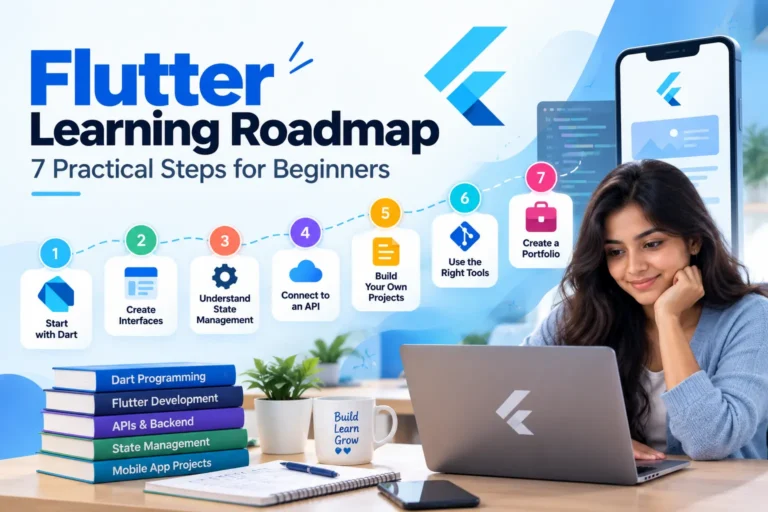
Dart → Flutter basics → Widgets → Layouts → Navigation → State → APIs → Local storage → Projects
There is no harm in jumping back and forth between these two subjects.
Do not start working on your projects after you feel comfortable in Flutter.
Your initial app does not have to be a success, it just needs to work.
Create something small, break it, fix it, and then create something a little bit larger.
Is Flutter difficult for beginners?
Flutter can feel unfamiliar at first because beginners need to understand Dart, widgets, layouts, and application state. However, starting with small projects makes these concepts much easier to understand.
Do I need to learn Dart before Flutter?
You should understand basic Dart concepts such as variables, functions, loops, classes, collections, null safety, and asynchronous programming. You do not need to master Dart before starting Flutter.
What should I learn first in Flutter?
Start with Dart fundamentals, Flutter widgets, layouts, navigation, state management, API integration, local storage, and then build practical projects.
Which Flutter project is best for beginners?
Simple projects such as a to-do app, expense tracker, notes app, weather app, or basic food-ordering interface are good options because they introduce common Flutter concepts gradually.
Is setState enough for beginners?
Yes. setState() is often sufficient for simple applications. As projects become more complex, developers can explore state-management solutions such as Provider, Riverpod, BLoC, or Cubit.